Beth Smith, M. Ed. | #smithingifted
One of the biggest misconceptions about gifted education is that gifted students are always “done early.”
In my classroom, that is not the goal.
My students are not simply rushing through assignments to get to free time. They are working through a carefully designed curriculum that builds over three years. The #smithingifted curriculum is structured to take students from 3rd grade through 5th grade using twelve Google Sheets filled with lessons, assignments, challenges, and skill-building activities.
There are four Google Sheets for 3rd grade, four for 4th grade, and four for 5th grade. Each sheet represents a nine-week learning cycle. Students work through the curriculum at their own pace, but they always have meaningful work in front of them. I also have an extra extension sheet ready for students who complete all twelve sheets before the end of their three-year gifted journey.
So in my classroom, students are never truly “finished.”
They are growing, progressing, creating, and moving toward the next level.
That is why I am adding Turing Tumble to the #smithingifted curriculum.
What Is Turing Tumble?
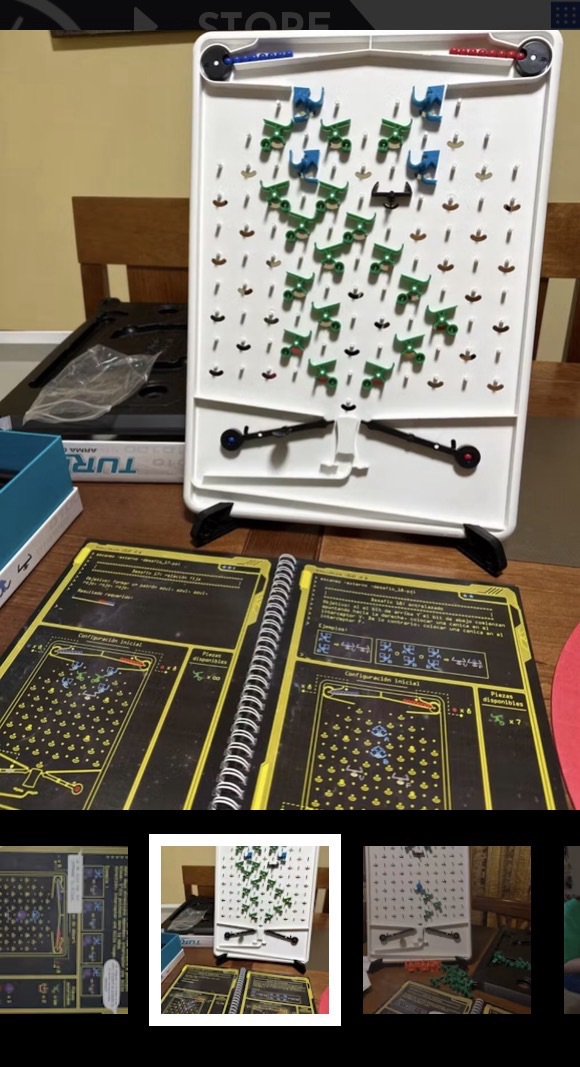
Turing Tumble is a hands-on, marble-powered logic game that teaches students how computers think. Students build mechanical systems using ramps, switches, bits, and gears. As marbles move through the board, students see logic, sequencing, cause and effect, and problem-solving come to life.
It looks like a game, but it is much more than that.
Turing Tumble teaches:
- Computational thinking
- Logic
- Sequencing
- Debugging
- Systems thinking
- Cause and effect
- Problem-solving
- Perseverance
- Engineering habits of mind
For gifted students, this is exactly the kind of learning tool that belongs in the classroom. It is challenging, visual, hands-on, and requires students to think deeply.
Why I Am Adding It to the Fourth Nine Weeks
In the #smithingifted curriculum, Turing Tumble will be introduced during the fourth nine weeks of each school year.
That means students will experience it in:
- 3rd grade, 4th nine weeks
- 4th grade, 4th nine weeks
- 5th grade, 4th nine weeks
This gives students something exciting to look forward to each year.
The first three Google Sheets of the year will focus on completing core gifted lessons, assignments, and challenges. Then, during the fourth nine weeks, students will have the opportunity to work with Turing Tumble as part of their enrichment and extension experience.
This structure gives students a clear message:
Your work matters.
Your progress matters.
Your effort opens the door to new challenges.
Turing Tumble becomes a motivator, but not in a shallow “reward” kind of way. It is not candy. It is not free time. It is not a break from learning.
It is the next level of learning.
Motivation Without Lowering Expectations
Gifted students need challenge. They also need motivation.
Sometimes students need to see that their steady progress is taking them somewhere exciting. By placing Turing Tumble in the fourth nine weeks, I am creating a built-in milestone that encourages students to stay focused during the first three nine-week cycles.
Students know that if they work consistently through their Google Sheets, they will eventually reach a hands-on logic and engineering experience that feels different from everything else they have done.
That kind of anticipation matters.
It gives students a reason to keep moving forward, especially when the work becomes difficult or when they would rather jump around from one exciting idea to another.
The message is simple:
Finish the foundation so you are ready for the challenge.
How It Fits the #smithingifted Curriculum
The #smithingifted curriculum is built around student choice, independent progress, creativity, and problem-solving. Students work at their own pace, complete assignments, earn badges, and move through structured learning pathways.
Turing Tumble fits perfectly into that system because it supports the same goals.
It gives students a chance to:
- Apply logic in a hands-on way
- Work independently or with a partner
- Practice productive struggle
- Debug mistakes
- Explain their thinking
- Create their own challenges
- Move from following directions to designing solutions
It also aligns beautifully with robotics, coding, STEM, engineering, and computational thinking.
Students are not just completing a puzzle. They are learning how systems work.
Gifted Students Need Productive Struggle
Many gifted students are used to things coming easily. When a task is difficult, they may shut down, rush, avoid the challenge, or become frustrated when they are not immediately successful.
Turing Tumble helps with that.
It does not always work the first time. The marble might go the wrong direction. A piece might be placed incorrectly. The system might fail. The output might not match the prediction.
And that is the point.
Students have to slow down and ask:
- What did I think would happen?
- What actually happened?
- Where did the system break down?
- Which piece needs to change?
- How can I test one adjustment at a time?
- What evidence tells me I am getting closer?
That is real learning.
Gifted students need experiences where they are not simply showing what they already know. They need experiences that stretch them into persistence, analysis, and revision.
A Screen-Free Way to Teach Coding Thinking
One of the things I love about Turing Tumble is that it teaches coding concepts without needing a computer.
Students physically build the logic.
They can see the sequence.
They can touch the pieces.
They can watch the cause and effect.
They can debug the system in real time.
This is powerful for students who may already enjoy coding, but it is also helpful for students who are new to computational thinking. Turing Tumble makes abstract ideas visible.
Students experience concepts like:
- Input and output
- Algorithms
- Conditional logic
- Binary thinking
- Variables
- Problem decomposition
- Debugging
It turns computer science into something students can build with their hands.
How Students Will Use Turing Tumble
During the fourth nine weeks, students will use Turing Tumble as a structured enrichment experience.
They may work through challenge cards, solve puzzles, explain their systems, or create new designs for other students to test.
A typical activity might include:
- Read the challenge.
- Predict what the system needs to do.
- Build the marble path.
- Test the design.
- Debug any problems.
- Explain how the solution works.
- Reflect on what changed during the process.
- Create a new challenge or extension.
This gives students a full learning cycle: plan, build, test, revise, explain, and extend.
Turing Tumble and the Four #smithingifted Levels
Turing Tumble also fits perfectly with the four levels I use for differentiation.
Level 1 – Explorer
Students follow a challenge and learn how the pieces work.
Level 2 – Engineer
Students explain how the system works and identify the logic behind the marble path.
Level 3 – Innovator
Students modify a challenge or design their own marble-powered system.
Level 4 – Visionary
Students create a challenge for others, teach the logic behind it, or connect the system to real-world computing, robotics, or engineering.
This allows every student to engage at an appropriate level of depth.
Some students may need to build confidence by following the provided challenges. Others may be ready to design their own logic systems. The structure allows for both.
It Builds Independence and Accountability
Because the #smithingifted curriculum is built around Google Sheets, students are already learning to manage assignments, track progress, and move through a sequence of learning tasks.
Turing Tumble adds another layer of independence.
Students will need to:
- Manage materials responsibly
- Follow multi-step directions
- Work through frustration
- Record progress
- Explain their solution
- Collaborate respectfully
- Reset the board for the next student
This is not just STEM. It is executive functioning, communication, responsibility, and perseverance.
It Gives Students Something to Look Forward To
One of the most powerful parts of adding Turing Tumble is the anticipation.
Students will know that the fourth nine weeks includes something special. They will know that their progress through the first three Google Sheets matters because it prepares them for a new kind of challenge.
That creates momentum.
It helps students see the curriculum as a journey instead of a pile of assignments.
They are not just completing sheets.
They are moving through levels.
They are earning opportunities.
They are becoming stronger thinkers.
Why This Matters
Gifted education should not be about giving students more work.
It should be about giving students more meaningful work.
The #smithingifted curriculum is designed to keep students challenged over time. It gives them structure, choice, independence, and room to grow. Adding Turing Tumble to the fourth nine weeks strengthens that system by giving students a hands-on, high-interest, deeply rigorous experience that rewards progress with challenge.
Turing Tumble gives students the chance to think like computer scientists, engineers, inventors, and problem-solvers.
It asks them to do what gifted learners need most:
Think deeply.
Try again.
Explain their reasoning.
Create something new.
Learn from mistakes.
Build confidence through challenge.
That is why Turing Tumble belongs in the #smithingifted curriculum.
It is not an extra.
It is a milestone.
It is a motivator.
It is a thinking tool.
And for my gifted students, it is one more way to make learning feel like an adventure worth working toward.


